> For the complete documentation index, see [llms.txt](https://docs.fireboom.io/llms.txt). Markdown versions of documentation pages are available by appending `.md` to page URLs; this page is available as [Markdown](https://docs.fireboom.io/v1.0/ji-chu-ke-shi-hua-kai-fa/api-gou-jian/kua-yuan-guan-lian.md).
# 关联查询
关联查询数据是API开发中的常见用例。有两种形式的关联查询:有外键关联和跨源关联。
## 有外键关联(嵌套关联)
在查询某个对象的同时,获取其关联对象,对应sql left join。使用关联查询,需要在数据库表间建立外键。
基于超图面板对gql的可视化封装,能充分发挥其嵌套查询的优势。甚至不需要掌握SQL,就能构建多级的嵌套查询。
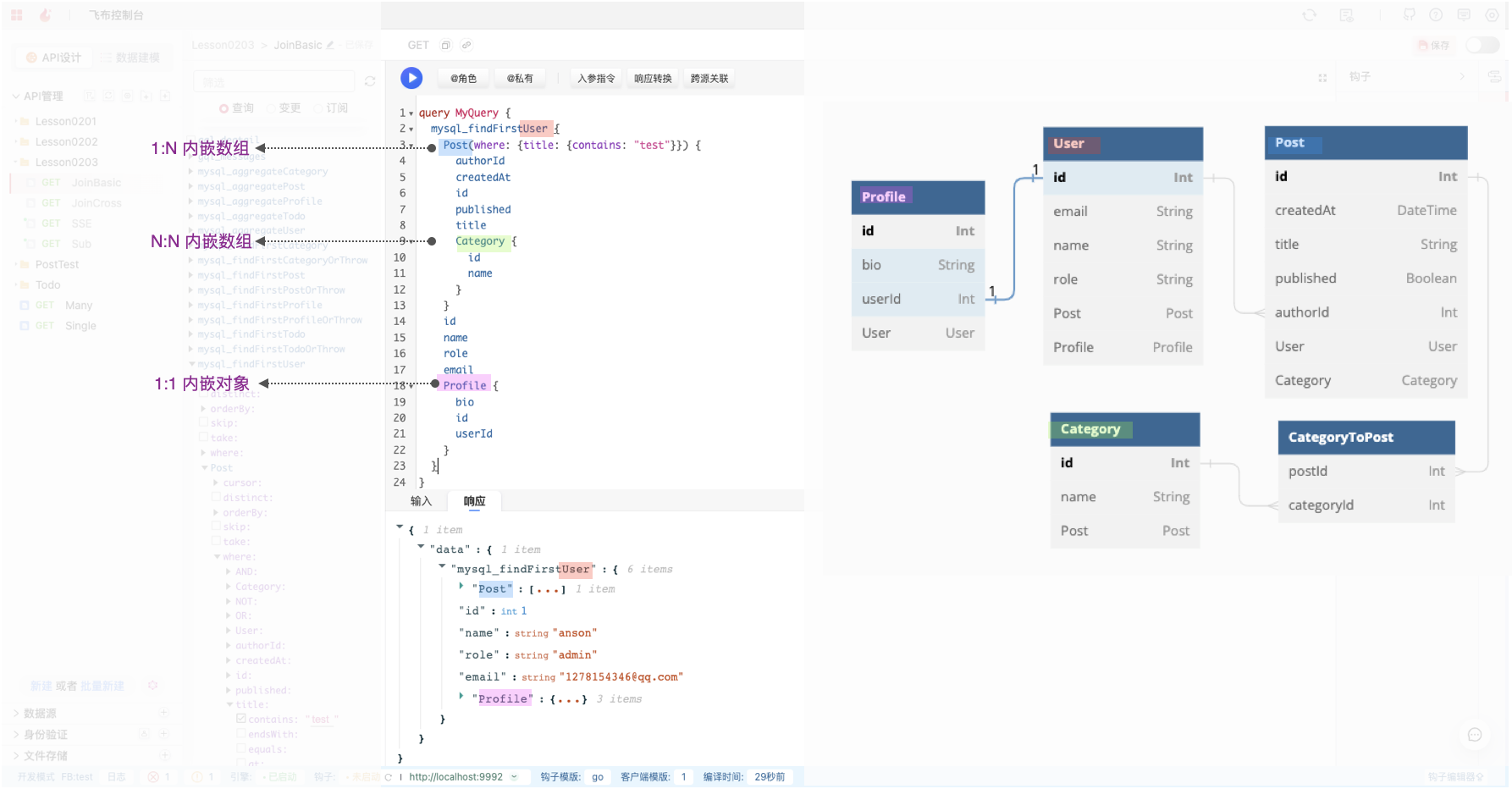
如图所示有4张主表,其中User和Profile是1:1关联,User和Post是 1对多关联,Post和Category是多对多关联。
其 Prisma Model 如下:
prisma model
```prisma
model Category {
id Int @id @default(autoincrement())
name String
Post Post[]
}
model Post {
id Int @id @default(autoincrement())
createdAt DateTime @default(now())
title String
published Boolean @default(false)
authorId Int
User User @relation(fields: [authorId], references: [id])
Category Category[]
@@index([authorId], map: "Post_authorId_fkey")
}
model Profile {
id Int @id @default(autoincrement())
bio String
userId Int @unique
User User @relation(fields: [userId], references: [id])
}
model User {
id Int @id @default(autoincrement())
email String @unique
name String?
role String @default("admin")
Post Post[]
Profile Profile?
}
```
{% hint style="info" %}
如何用prisma model建立关联关系,可参考[Prisma文档](https://www.prisma.io/docs/concepts/components/prisma-schema/relations/one-to-one-relations)
{% endhint %}
我们构建了如图所示的多级嵌套查询OPERATION,以User表为主体,查询到的Profile是对象,查询到的Post是数组,Post中的Category也是数组。
```graphql
query MyQuery {
mysql_findFirstUser {
id
name
email
# 1:n关联:post为对象数组
Post(where: {title: {contains: "test"}}) {
id
title
# n:n关联:category为对象数组
Category {
id
name
}
}
# 1:1关联:profile为对象
Profile {
id
userId
}
}
}
```
### N+1查询
在架构图中,我们提到过飞布引擎做了很多性能优化,其中之一是N+1查询优化。
我们以示例讲解下,飞布如何实现的查询优化。
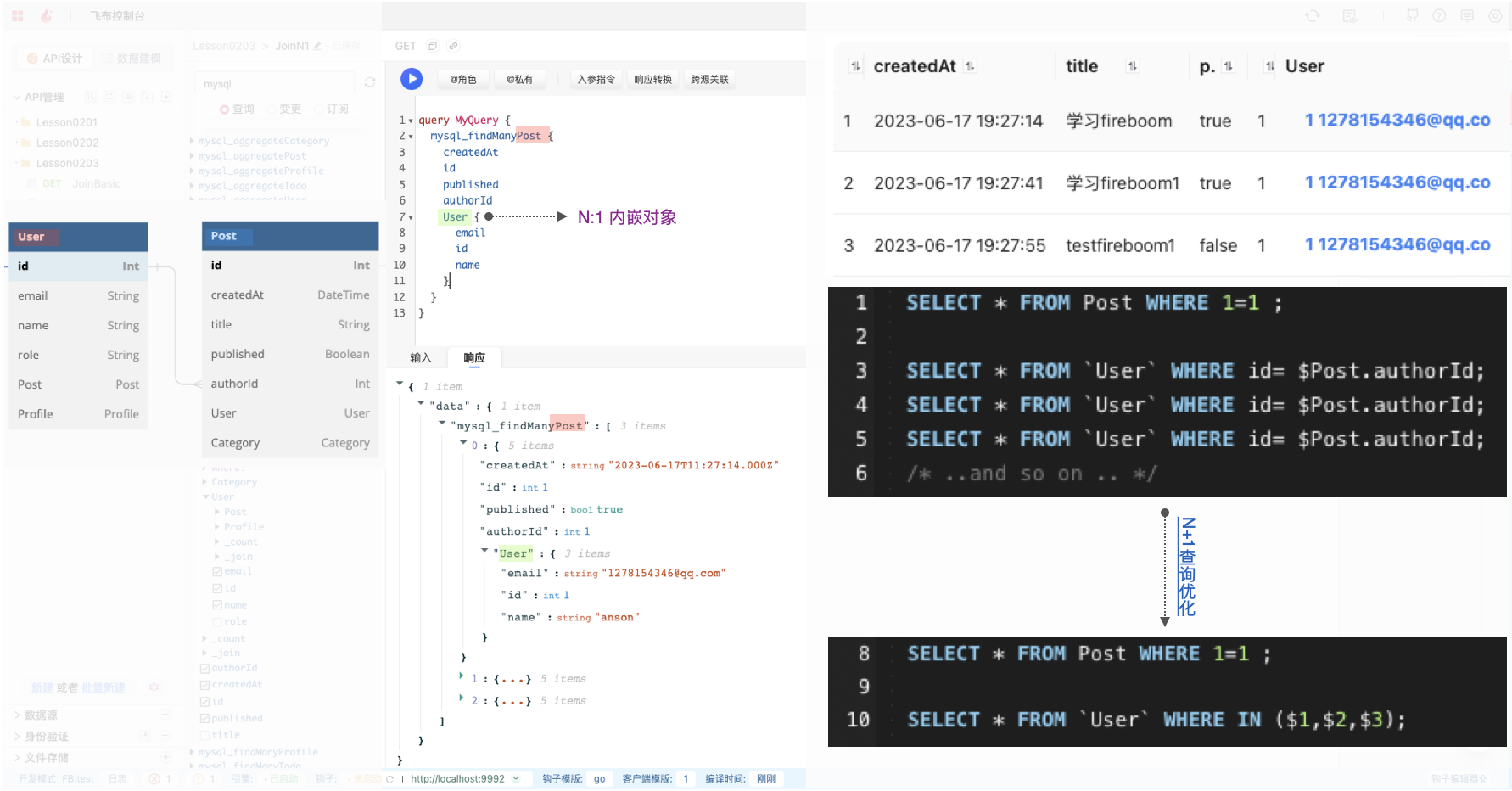
还以上述表为例,User和Post为1对多关联,这时候我们构建了一个新的Operation,查询Post的User,即查询文章的同时拿到作者信息。可以看到如下响应,其中User为对象。
这里有个问题,3条Post的作者是同一个,是否意味着:飞布会查询3次用户。类似这样上图,先查询所有文章,然后遍历文章,挨个查询作者,最后再合并。
实际上,在底层我们做了N+1查询优化,用where in 的方式避免了无用的查询。将上述sql改成了,先查询所有文章,然后用文章的作者id注入where in语句中。
这样能极大提升性能,避免不必要的数据库请求。
## 跨源关联
跨源关联有两种常见用例:同一数据库表间未建立外键、跨数据源关联查询。
{% embed url="" fullWidth="false" %}
11功能介绍-飞布如何实现跨源关联?
{% endembed %}
例如 获取物联网设备列表,并查看设备在线状态。传统模式下,我们需要先从数据库获取设备列表,然后遍历数据,逐个调用物联网平台接口获取设备在线状态,最后拼接数据返回给客户端。用编码的方式,大概需要几百行代码。
而利用飞布的跨源关联功能,只需要几行graphql描述就能实现上述需求。
跨源关联本质上是一种流程编排,将通常情况下并行的请求,改造成串行。
跨源关联时序图
使用跨源关联,至少需要配置两个数据源(或同一数据源两个不同函数)。例如,db为数据库,iot为物联网REST API。
```graphql
query MyQuery($device_id:Int! @internal) { # 声明:定义变量 $device_id
db_findManyDevice {
id @export(as:"device_id")# 赋值: $device_id = id
name
# _join 字段返回类型Query!
# 它存在于每个对象类型上,所以你可以在Query文档的任何地方看到它
_join{
iot_deviceState(device_id: $device_id) { # 使用:将 $device_id 设置给 device_id 变量
status
}
}
}
}
```
上述示例,主要分为三个环节:
* 声明:@internal 指令从公开API中移除 $device\_id 变量。这意味,用户不能手工设置它。我们称它为关联键(join key)。
* 赋值:使用 @export 指令,我们可以将字段 \`id\`的值导出给关联键($device\_id)
* 使用:一旦我们进入 \_join 字段,我们可以使用 $device\_id 变量去关联物联网 API
其中涉及到两个知识点:
* 指令: `@internal` 用于定义变量;`@export` 用于赋值变量。
* \_join字段:join字段是一个特殊的字段,是query类型。这种定义方式,实现了循环嵌套!
---
# Agent Instructions
This documentation is published with GitBook. GitBook is the documentation platform designed so that both humans and AI agents can read, navigate, and reason over technical content effectively. Learn more at gitbook.com.
## Querying This Documentation
If you need additional information that is not directly available in this page, you can query the documentation by asking a question.
Perform an HTTP GET request on the following URL with the `ask` and `goal` query parameters:
```
GET https://docs.fireboom.io/v1.0/ji-chu-ke-shi-hua-kai-fa/api-gou-jian/kua-yuan-guan-lian.md?ask=&goal=
```
`ask` is the immediate question: it should be specific, self-contained, and written in natural language.
`goal` is what the user is ultimately trying to achieve, the reason they need the answer. Sharing it helps GitBook give you a better, more relevant answer. A goal is most helpful when it describes the outcome the user wants rather than restating the question. For example, with `ask=how do I create an API token`, a goal like `automate deployments from our CI pipeline` lets GitBook tailor the answer to that use case.
The response will contain a direct answer to the question and relevant excerpts and sources from the documentation.
Use this mechanism when the answer is not explicitly present in the current page, you need clarification or additional context, or you want to retrieve related documentation sections.