> For the complete documentation index, see [llms.txt](https://docs.fireboom.io/llms.txt). Markdown versions of documentation pages are available by appending `.md` to page URLs; this page is available as [Markdown](https://docs.fireboom.io/v1.0/jin-jie-gou-zi-ji-zhi/wen-jian-shang-chuan-gou-zi.md).
# 文件上传钩子
我们已经学习过如何[上传文件](/v1.0/ji-chu-ke-shi-hua-kai-fa/wen-jian-cun-chu.md),今天我们学习文件上传的2个钩子。
首先,我们看下文件上传的时序图。
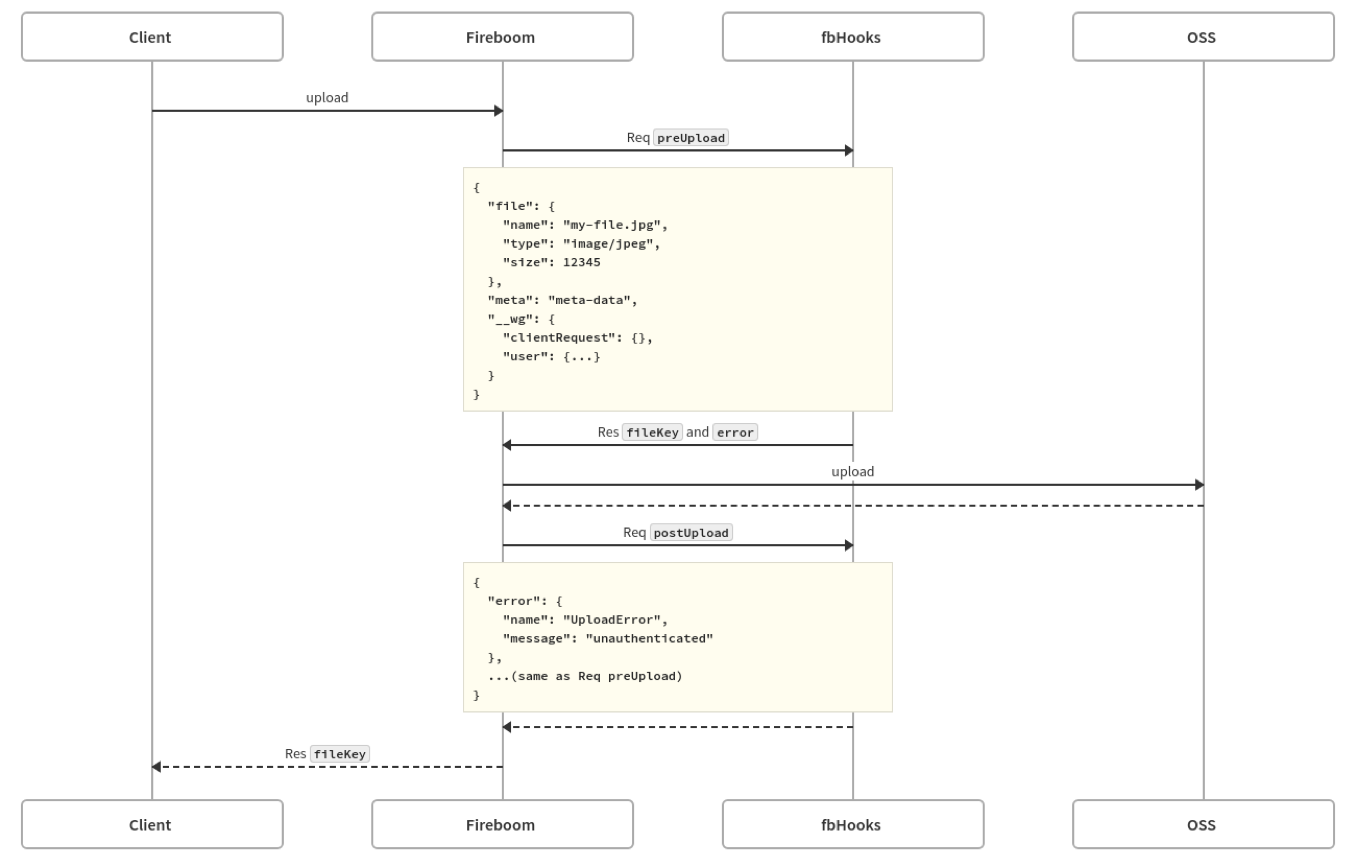 它涉及4部分,客户端、飞布服务、钩子服务和OSS服务。
1. 客户端上传文件到飞布服务
2. 飞布服务调用前置钩子,对文件进行处理或校验,并返回文件名或错误信息。
3. 飞布上传文件到OSS服务
4. 飞布调用后置钩子,处理文件上传错误或存储上传成功的文件信息。
5. 将文件名或错误信息返还给客户端,
## 前置钩子
`preUpload` 钩子又名文件上传前置钩子,在文件上传到OSS前执行,主要用例:
* 改变文件的存储路径
* 或校验文件格式是否合法
```http
http://{serverAddress}/upload/{providerName}/{profileName}/preUpload
Example:: http://localhost:9992/upload/alioss/default/preUpload
Content-Type: application/json
X-Request-Id: "83821325-9638-e1af-f27d-234624aa1824"
# JSON request
{
"file": { // 上传文件的信息
"name": "my-file.jpg",
"type": "image/jpeg",
"size": 12345
},
"meta": "meta-data", // 上传时携带的元数据。由请求头X-Metadata设置
"__wg": { // 全局参数(user字段可选)
"clientRequest": {},
"user": {
"userID": "1"
}
}
}
# JSON response
{
"error": "unauthenticated", // 异常时返回的报错
"fileKey": "my-file.jpg" // 自定义OSS中使用的文件名
}
```
{% tabs %}
{% tab title="golang" %}
```go
package avatar
import (
"custom-go/generated"
"custom-go/pkg/base"
"custom-go/pkg/plugins"
)
func PreUpload(request *base.UploadHookRequest, body *plugins.UploadBody[generated.Fireboom_avatarProfileMeta]) (*base.UploadHookResponse, error) {
// 修改上传到OSS中的文件名称
return &base.UploadHookResponse{FileKey: body.File.Name}, nil
}
```
{% endtab %}
{% endtabs %}
## 后置钩子
postUpload 钩子又名文件上传后置钩子,在文件上传到OSS后执行,主要用例:
* 上传成功或失败后发送消息通知
* 或存储文件的URL到数据库
```http
http://{serverAddress}/upload/{providerName}/{profileName}/postUpload
Example:: http://localhost:9992/upload/alioss/default/postUpload
Content-Type: application/json
X-Request-Id: "83821325-9638-e1af-f27d-234624aa1824"
# JSON request
{
"error": {//上传到OSS时的错误信息
"name": "UploadError", // 固定值
"message": "unauthenticated" // 异常原因
},
"file": { // 上传文件的信息
"name": "my-file.jpg", // 这里是修改过后的文件名称,不一定是客户端的名称
"type": "image/jpeg",
"size": 12345
},
"meta": "meta-data", // 上传时携带的元数据。由请求头X-Metadata设置
"__wg": {
"clientRequest": {},
"user": {
"userID": "1"
}
}
}
# JSON response
no response
```
{% tabs %}
{% tab title="golang" %}
```go
package avatar
import (
"custom-go/generated"
"custom-go/pkg/base"
"custom-go/pkg/plugins"
"custom-go/pkg/types"
"custom-go/pkg/utils"
"errors"
"fmt"
)
func PostUpload(request *base.UploadHookRequest, body *plugins.UploadBody[generated.Fireboom_avatarProfileMeta]) (*base.UploadHookResponse, error) {
if body.Error.Name != "" {
// 这里可以发送通知~
return nil, errors.New(body.Error.Message)
}
// 文件上传成功
fmt.Println(body.File.Name)
// 根据当前的Provider名读取S3配置
provider := types.GetS3ConfigByProvider(body.File.Provider)
// 构建访问文件的URL
fmt.Println(utils.GetConfigurationVal(provider.Endpoint), "/", utils.GetConfigurationVal(provider.BucketName), "/", body.File.Name)
fmt.Println(utils.GetConfigurationVal(provider.BucketName), ".", utils.GetConfigurationVal(provider.Endpoint), "/", body.File.Name)
return nil, nil
}
```
{% endtab %}
{% endtabs %}
## 文件元数据meta
上述两个钩子,都包含一个特殊入参:meta 文件元数据。
其用途是在上传文件的同时,额外补充业务信息。
它涉及4部分,客户端、飞布服务、钩子服务和OSS服务。
1. 客户端上传文件到飞布服务
2. 飞布服务调用前置钩子,对文件进行处理或校验,并返回文件名或错误信息。
3. 飞布上传文件到OSS服务
4. 飞布调用后置钩子,处理文件上传错误或存储上传成功的文件信息。
5. 将文件名或错误信息返还给客户端,
## 前置钩子
`preUpload` 钩子又名文件上传前置钩子,在文件上传到OSS前执行,主要用例:
* 改变文件的存储路径
* 或校验文件格式是否合法
```http
http://{serverAddress}/upload/{providerName}/{profileName}/preUpload
Example:: http://localhost:9992/upload/alioss/default/preUpload
Content-Type: application/json
X-Request-Id: "83821325-9638-e1af-f27d-234624aa1824"
# JSON request
{
"file": { // 上传文件的信息
"name": "my-file.jpg",
"type": "image/jpeg",
"size": 12345
},
"meta": "meta-data", // 上传时携带的元数据。由请求头X-Metadata设置
"__wg": { // 全局参数(user字段可选)
"clientRequest": {},
"user": {
"userID": "1"
}
}
}
# JSON response
{
"error": "unauthenticated", // 异常时返回的报错
"fileKey": "my-file.jpg" // 自定义OSS中使用的文件名
}
```
{% tabs %}
{% tab title="golang" %}
```go
package avatar
import (
"custom-go/generated"
"custom-go/pkg/base"
"custom-go/pkg/plugins"
)
func PreUpload(request *base.UploadHookRequest, body *plugins.UploadBody[generated.Fireboom_avatarProfileMeta]) (*base.UploadHookResponse, error) {
// 修改上传到OSS中的文件名称
return &base.UploadHookResponse{FileKey: body.File.Name}, nil
}
```
{% endtab %}
{% endtabs %}
## 后置钩子
postUpload 钩子又名文件上传后置钩子,在文件上传到OSS后执行,主要用例:
* 上传成功或失败后发送消息通知
* 或存储文件的URL到数据库
```http
http://{serverAddress}/upload/{providerName}/{profileName}/postUpload
Example:: http://localhost:9992/upload/alioss/default/postUpload
Content-Type: application/json
X-Request-Id: "83821325-9638-e1af-f27d-234624aa1824"
# JSON request
{
"error": {//上传到OSS时的错误信息
"name": "UploadError", // 固定值
"message": "unauthenticated" // 异常原因
},
"file": { // 上传文件的信息
"name": "my-file.jpg", // 这里是修改过后的文件名称,不一定是客户端的名称
"type": "image/jpeg",
"size": 12345
},
"meta": "meta-data", // 上传时携带的元数据。由请求头X-Metadata设置
"__wg": {
"clientRequest": {},
"user": {
"userID": "1"
}
}
}
# JSON response
no response
```
{% tabs %}
{% tab title="golang" %}
```go
package avatar
import (
"custom-go/generated"
"custom-go/pkg/base"
"custom-go/pkg/plugins"
"custom-go/pkg/types"
"custom-go/pkg/utils"
"errors"
"fmt"
)
func PostUpload(request *base.UploadHookRequest, body *plugins.UploadBody[generated.Fireboom_avatarProfileMeta]) (*base.UploadHookResponse, error) {
if body.Error.Name != "" {
// 这里可以发送通知~
return nil, errors.New(body.Error.Message)
}
// 文件上传成功
fmt.Println(body.File.Name)
// 根据当前的Provider名读取S3配置
provider := types.GetS3ConfigByProvider(body.File.Provider)
// 构建访问文件的URL
fmt.Println(utils.GetConfigurationVal(provider.Endpoint), "/", utils.GetConfigurationVal(provider.BucketName), "/", body.File.Name)
fmt.Println(utils.GetConfigurationVal(provider.BucketName), ".", utils.GetConfigurationVal(provider.Endpoint), "/", body.File.Name)
return nil, nil
}
```
{% endtab %}
{% endtabs %}
## 文件元数据meta
上述两个钩子,都包含一个特殊入参:meta 文件元数据。
其用途是在上传文件的同时,额外补充业务信息。
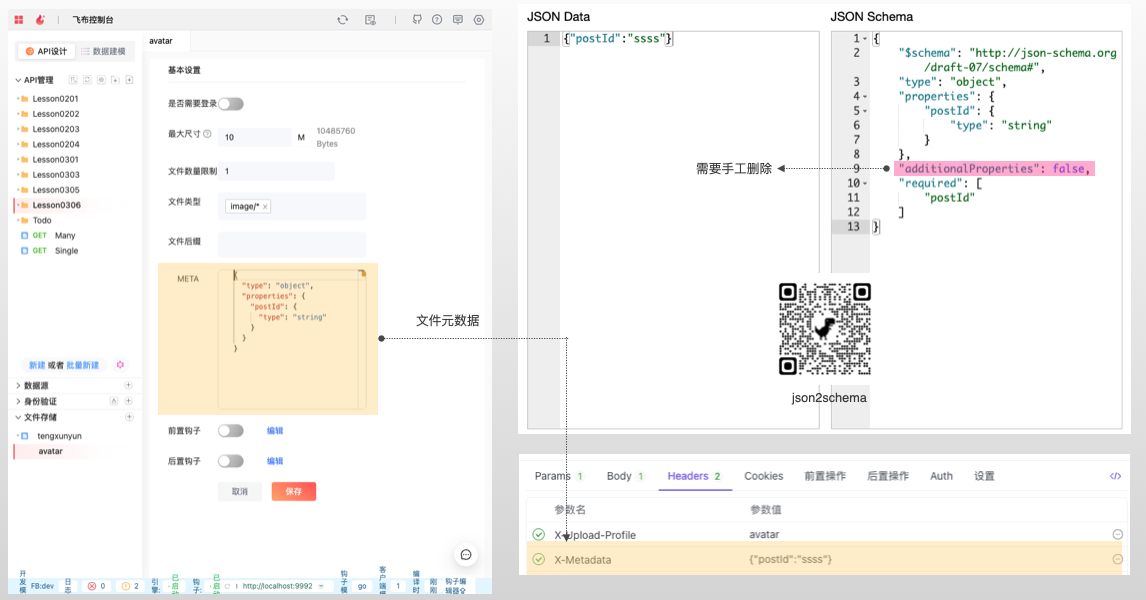 使用方式如下:
#### 1,设置meta
在meta中填入JSON对象的json schema描述,限制元数据的格式。
jsonschema比较复杂,可以利用[工具](https://www.lddgo.net/string/generate-json-schema)自动生成。例如,若想在上传图片的同时也附带图片所属的文章id,其:
JSON DATA为:
```json
{
"postId":"xxx"
}
```
JSON SCHEMA为:
{% code lineNumbers="true" %}
```json
{
"$schema": "http://json-schema.org/draft-07/schema#",
"type": "object",
"properties": {
"postId": {
"type": "string"
}
},
"additionalProperties": false,// 暂不支持该特性,需要删除
"required": [ // 意思是使用该profile上传文件时,必须要在 x-meatadata 中携带 下列字段
"postId"
]
}
```
{% endcode %}
{% hint style="info" %}
由于Fireboom兼容的json schema版本较低,要手工删除第9行:additionproperties字段。
{% endhint %}
#### 2,上传文件
在调用上传接口时,在请求头中设置`x-meatadata`为对应的JSON data。
```bash
curl 'http://localhost:9991/s3/[s3-name]/upload?directory=test' \
# 设置Profile名称,从枚举值中选择
-H 'X-Upload-Profile: avatar' \
# 设置meta的数据,必须要符合json schema的要求
-H 'X-Metadata: {"postId":"ssss"}' \
-H 'Content-Type: multipart/form-data; boundary=----WebKitFormBoundaryGB1RSwk0aZy4QW9J' \
# 可选
-H 'Cookie: user=xxx; id=xxx=; csrf=xx;' \
-H 'accept: application/json' \
--data-raw $'------WebKitFormBoundaryGB1RSwk0aZy4QW9J\r\nContent-Disposition: form-data; name="file"; filename="108*108.png"\r\nContent-Type: image/png\r\n\r\n\r\n------WebKitFormBoundaryGB1RSwk0aZy4QW9J--\r\n' \
--compressed
```
#### 3,使用钩子
后续可以在钩子中使用 meta。Meta对象按照json schema定义。
{% tabs %}
{% tab title="golang" %}
```go
func PostUpload(request *base.UploadHookRequest, body *plugins.UploadBody[generated.Tengxunyun_avatarProfileMeta]) (*base.UploadHookResponse, error) {
fmt.Println(body.Meta)//使用Meta
return nil, nil
}
```
{% endtab %}
{% endtabs %}
## 临时签名
公开可读的bucket拿到路径后就能访问,但如果是私有bucket则需要临时签名才能访问。
使用方式如下:
#### 1,设置meta
在meta中填入JSON对象的json schema描述,限制元数据的格式。
jsonschema比较复杂,可以利用[工具](https://www.lddgo.net/string/generate-json-schema)自动生成。例如,若想在上传图片的同时也附带图片所属的文章id,其:
JSON DATA为:
```json
{
"postId":"xxx"
}
```
JSON SCHEMA为:
{% code lineNumbers="true" %}
```json
{
"$schema": "http://json-schema.org/draft-07/schema#",
"type": "object",
"properties": {
"postId": {
"type": "string"
}
},
"additionalProperties": false,// 暂不支持该特性,需要删除
"required": [ // 意思是使用该profile上传文件时,必须要在 x-meatadata 中携带 下列字段
"postId"
]
}
```
{% endcode %}
{% hint style="info" %}
由于Fireboom兼容的json schema版本较低,要手工删除第9行:additionproperties字段。
{% endhint %}
#### 2,上传文件
在调用上传接口时,在请求头中设置`x-meatadata`为对应的JSON data。
```bash
curl 'http://localhost:9991/s3/[s3-name]/upload?directory=test' \
# 设置Profile名称,从枚举值中选择
-H 'X-Upload-Profile: avatar' \
# 设置meta的数据,必须要符合json schema的要求
-H 'X-Metadata: {"postId":"ssss"}' \
-H 'Content-Type: multipart/form-data; boundary=----WebKitFormBoundaryGB1RSwk0aZy4QW9J' \
# 可选
-H 'Cookie: user=xxx; id=xxx=; csrf=xx;' \
-H 'accept: application/json' \
--data-raw $'------WebKitFormBoundaryGB1RSwk0aZy4QW9J\r\nContent-Disposition: form-data; name="file"; filename="108*108.png"\r\nContent-Type: image/png\r\n\r\n\r\n------WebKitFormBoundaryGB1RSwk0aZy4QW9J--\r\n' \
--compressed
```
#### 3,使用钩子
后续可以在钩子中使用 meta。Meta对象按照json schema定义。
{% tabs %}
{% tab title="golang" %}
```go
func PostUpload(request *base.UploadHookRequest, body *plugins.UploadBody[generated.Tengxunyun_avatarProfileMeta]) (*base.UploadHookResponse, error) {
fmt.Println(body.Meta)//使用Meta
return nil, nil
}
```
{% endtab %}
{% endtabs %}
## 临时签名
公开可读的bucket拿到路径后就能访问,但如果是私有bucket则需要临时签名才能访问。
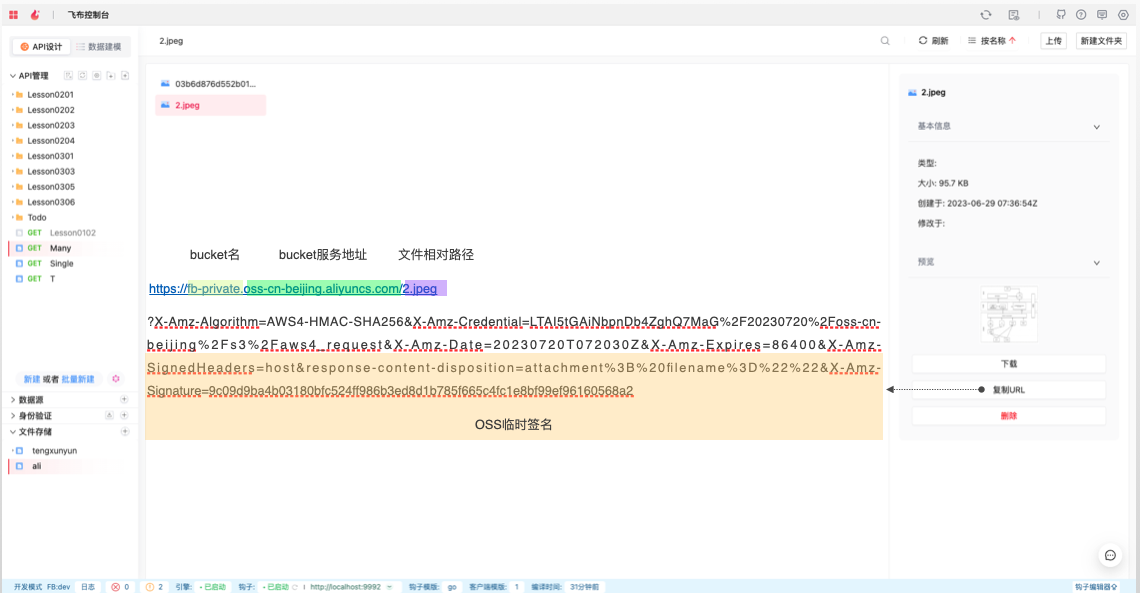 如图,文件2.jpeg,需要追加上述后缀(临时签名),才能访问。
{% tabs %}
{% tab title="golang" %}
```go
package customize
import (
"context"
"custom-go/pkg/plugins"
"custom-go/pkg/types"
"custom-go/pkg/utils"
"custom-go/pkg/wgpb"
"fmt"
"net/url"
"time"
"github.com/graphql-go/graphql"
"github.com/minio/minio-go/v7"
"github.com/minio/minio-go/v7/pkg/credentials"
)
var (
fields = graphql.Fields{
"presignedURL": &graphql.Field{
Type: graphql.String,
Description: "生成S3的临时地址",
Args: graphql.FieldConfigArgument{
"fileName": &graphql.ArgumentConfig{
Type: graphql.String,
},
"providerName": &graphql.ArgumentConfig{
Type: graphql.String,
},
},
Resolve: func(params graphql.ResolveParams) (interface{}, error) {
_ = plugins.GetGraphqlContext(params)
providerName, _ := params.Args["providerName"].(string)
fileName, _ := params.Args["fileName"].(string)
provider := types.GetS3ConfigByProvider(providerName)
client, err := NewMinioClient(provider)
if err != nil {
return nil, err
}
reqParams := make(url.Values)
reqParams.Set("response-content-disposition", fmt.Sprintf("attachment; filename=\"%s\"", fileName))
// Generates a presigned url which expires in a day.
presignedURL, err := client.PresignedGetObject(context.TODO(), utils.GetConfigurationVal(provider.BucketName), fileName, time.Second*24*60*60, reqParams)
if err != nil {
return nil, err
}
url := fmt.Sprintf("%s://%s%s?%s", presignedURL.Scheme, presignedURL.Host, presignedURL.Path, presignedURL.RawQuery)
return url, nil
},
},
}
rootQuery = graphql.ObjectConfig{Name: "RootQuery", Fields: fields}
S3_schema, _ = graphql.NewSchema(graphql.SchemaConfig{Query: graphql.NewObject(rootQuery)})
)
func NewMinioClient(s3Upload *wgpb.S3UploadConfiguration) (client *minio.Client, err error) {
client, err = minio.New(utils.GetConfigurationVal(s3Upload.Endpoint), &minio.Options{
Creds: credentials.NewStaticV4(utils.GetConfigurationVal(s3Upload.AccessKeyID), utils.GetConfigurationVal(s3Upload.SecretAccessKey), ""),
Secure: s3Upload.UseSSL,
})
return
}
```
{% endtab %}
{% endtabs %}
如图,文件2.jpeg,需要追加上述后缀(临时签名),才能访问。
{% tabs %}
{% tab title="golang" %}
```go
package customize
import (
"context"
"custom-go/pkg/plugins"
"custom-go/pkg/types"
"custom-go/pkg/utils"
"custom-go/pkg/wgpb"
"fmt"
"net/url"
"time"
"github.com/graphql-go/graphql"
"github.com/minio/minio-go/v7"
"github.com/minio/minio-go/v7/pkg/credentials"
)
var (
fields = graphql.Fields{
"presignedURL": &graphql.Field{
Type: graphql.String,
Description: "生成S3的临时地址",
Args: graphql.FieldConfigArgument{
"fileName": &graphql.ArgumentConfig{
Type: graphql.String,
},
"providerName": &graphql.ArgumentConfig{
Type: graphql.String,
},
},
Resolve: func(params graphql.ResolveParams) (interface{}, error) {
_ = plugins.GetGraphqlContext(params)
providerName, _ := params.Args["providerName"].(string)
fileName, _ := params.Args["fileName"].(string)
provider := types.GetS3ConfigByProvider(providerName)
client, err := NewMinioClient(provider)
if err != nil {
return nil, err
}
reqParams := make(url.Values)
reqParams.Set("response-content-disposition", fmt.Sprintf("attachment; filename=\"%s\"", fileName))
// Generates a presigned url which expires in a day.
presignedURL, err := client.PresignedGetObject(context.TODO(), utils.GetConfigurationVal(provider.BucketName), fileName, time.Second*24*60*60, reqParams)
if err != nil {
return nil, err
}
url := fmt.Sprintf("%s://%s%s?%s", presignedURL.Scheme, presignedURL.Host, presignedURL.Path, presignedURL.RawQuery)
return url, nil
},
},
}
rootQuery = graphql.ObjectConfig{Name: "RootQuery", Fields: fields}
S3_schema, _ = graphql.NewSchema(graphql.SchemaConfig{Query: graphql.NewObject(rootQuery)})
)
func NewMinioClient(s3Upload *wgpb.S3UploadConfiguration) (client *minio.Client, err error) {
client, err = minio.New(utils.GetConfigurationVal(s3Upload.Endpoint), &minio.Options{
Creds: credentials.NewStaticV4(utils.GetConfigurationVal(s3Upload.AccessKeyID), utils.GetConfigurationVal(s3Upload.SecretAccessKey), ""),
Secure: s3Upload.UseSSL,
})
return
}
```
{% endtab %}
{% endtabs %}